Learn about Nova’s built-in wiki and how to leverage it for your game
No matter the genre, no matter the complexity or depth, every game has its own world to build. Some games may simply desire to have a place to showcase custom uniforms or share some brief information about the current mission settings. Others may create broad universes with volumes of information to aid the game’s players with capturing the full scope of the world in which they are exploring.Nova’s Wiki, powered by Thresher, enables any set of players to easily create, collaborate, and deploy the information they wish to share without having to possess any programming knowledge. Robust pages can be easily created and styled with a simple WYSIWYG (What You See Is What You Get) editor.
For the purposes of this guide, we are assuming that you are using a fresh Nova install, with no pages, categories, or other editing yet performed on your wiki.
Quick Tour
Upon a fresh installation of Nova, the wiki’s basic structure will appear very sterile. Everything you need, however, is available for the game’s users to start creating.The main page appears with a simple header and paragraph, immediately informing you that Thresher is available for service. The navigational system is also installed and ready, giving you immediate access to the wiki’s powerful functionality.
Recent changes
As wikis grow, it can be difficult for anyone, especially the game’s players, to keep track of changes, whether they be new articles or updates to existing pages. Thresher’s Recent Changes system simplifies this herculean task and allows anyone to see any new changes at a glance.Users can sort changes by recent updates or recently created, allowing them to search for specific changes.Each entry will also feature an update summary, provided the last user entered a comment into that field.
Categories
The Wiki Categories page provides quick access to all of the categories available in the wiki. If a page is not added to a category, it will automatically be added to the Uncategorized listing. By clicking on a category, Nova will show you all pages attached to that category.From this page, you will also be able to edit any of the categories in the system, or add new categories of your own.
Pages can have more than one category assigned to them. If you have multiple options available, don’t be pressured to choose only one category. Add all categories that may apply so that your fellow players can find the page more quickly in the future.
Manage pages
The Manage Wiki Pages page is available to all players, allowing everyone to see a full list of pages that are saved in the wiki.From this page, any active user can:
Create a new page
Filter the pages based on:
Standard: any page created by any user.
System: any page created by the system installation and required for operation.
Restricted: any page “locked” by the management team to prevent unnecessary editing by any user.
All: a comprehensive list of all pages in the wiki.
Search existing pages
Clean up drafts of existing pages
Each page in the listing will have a set of options available to you.
From Left to Right, these options are:
Information: displays information about when the page was created and who it was created by, and also the last time when and who updated the page last.
History: displays a complete list of the page’s edit history. From this list, you can see the previous versions of the page as long as the drafts have not been cleaned up (purged).
Lock: restrict edit access to select access roles already available within Nova. This feature is reserved only for System administrators.
View: moves the user from the Manage page to view the selected page in full.
Delete: deletes the page. This feature is reserved for Basic and System administrators.
Edit: allows you to edit the page.
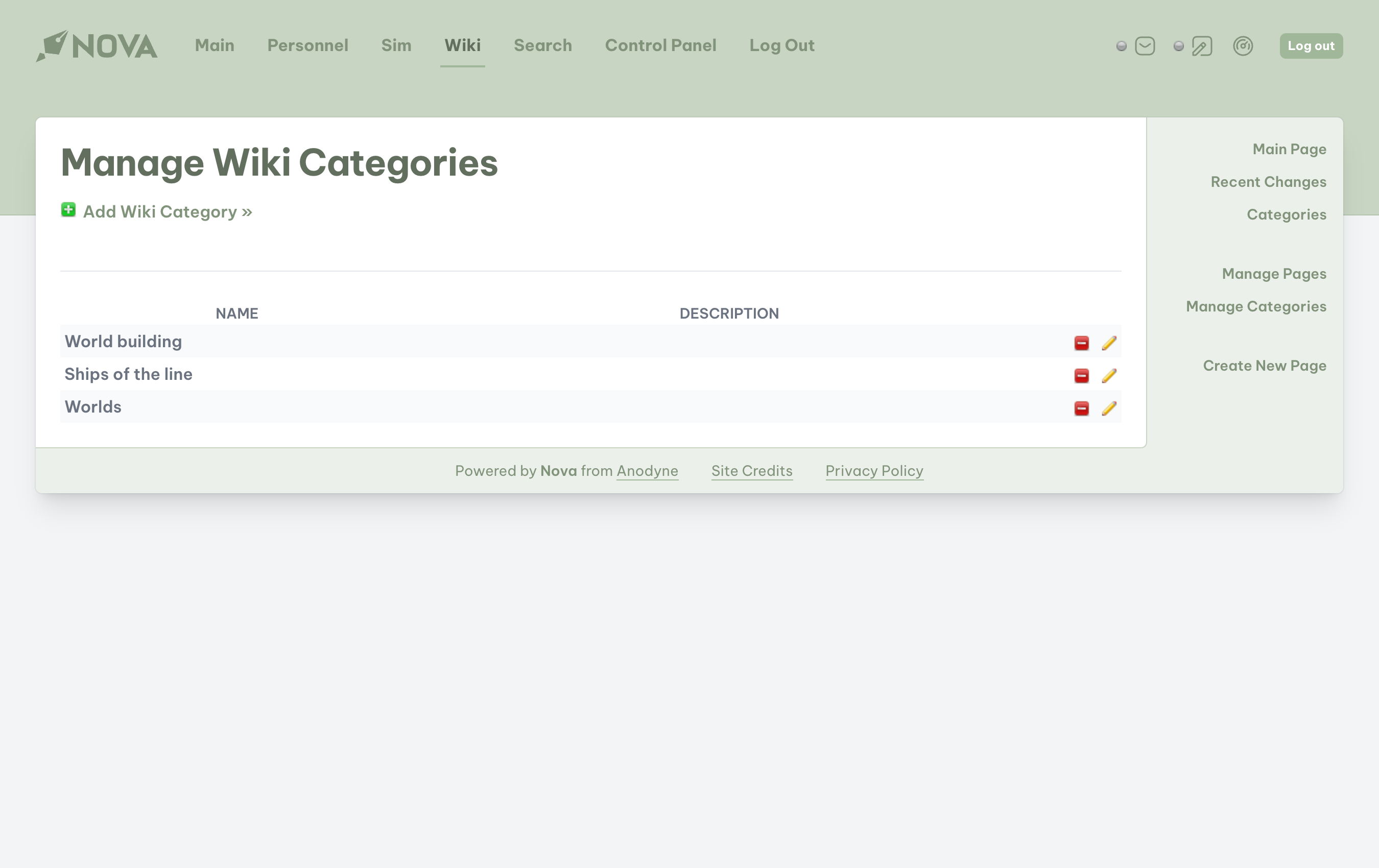
Manage categories
This page is available only to users with the Basic or System administrator access role.
From this page, you will be able to add, edit, and delete any wiki category. When categories are available, you will be able to see the name of the category, as well as a description that will let users know what the general purpose of that category is for.
Editing the wiki
With our tour complete, let’s add our first new page in the wiki. Our game follows the adventures of the USS Enterprise-D from the Star Trek universe. In our game, we are about to encounter a dangerous species called the “Borg.” We need to give our players some information on this species so that they know what to expect.
Creating a category
Since this is our first wiki article, we will need to create a category to put this article in, as well as future pages for other species that we’ll encounter in later stories.Navigate to the Manage Categories page, which is located on the Wiki’s sidebar. From there, select Add Wiki Category from the top of the page.Whenever you add or edit a category, the following options will be available:
Name: the name of the category.
Description: a summary of the purpose of that category.
We will be creating a category for Alien Species. Once you’ve entered your information, click the Add button and the category will be immediately available in the wiki.
Creating a page
Let’s start building our page on the Borg. Navigate to the Create New Page on the Wiki’s sidebar. Whether you are creating a page, or editing one, the following options will be available:
Title: the name of the page. This field is required for the page to be published.
Summary: a short preview or summary of the page that will show up in page listings to give users an idea of what information the page contains.
Content: all of the page’s content will be entered into this WYSIWYG box. Unlike mission posts, the wiki will require ALL content to be entered as if you were writing an HTML page.
If you are not familiar with HTML language, even in a basic form, the content box provides handy tools to help you create the page, including headings and subheadings, text formatting, lists, images, and links to other sites.
The content box also two handy tools, located to the far right of the toolbar:
Clean: removes unused or “broken” HTML tags or code throughout the content box. This icon looks like an opening and closing tag with a small red delete icon.
Preview: generates a preview of the finished page below the content box so that you can see what your page would look like. This is handy for identifying HTML formatting that you may have missed, such as paragraph breaks. The Preview icon looks like a green checkmark.
Categories: a selection of categories already available within the Wiki. Note that the category for Alien Species is already here and ready for use. You can also add categories directly from this box.
Comments: determine whether you will allow others to leave comments on your page, or if you want to restrict discussion.
Thresher does not store images, nor does it have the ability for any user to upload pictures to it. If you wish to add images, you will need to upload them to a desired location, such as to a folder on your webhost using an FTP program, or use Nova’s image uploader and store the image(s) in a section such as the Specifications or Tour categories. You will need the URL of the image and its location to enter into your wiki page.
Let’s work on creating our page. Add a title and a summary. As you work in the content box, you’ll notice that this is not a normal text box.
Enter the content of the page, being sure to use the paragraph icon in the toolbar whenever you add a new paragraph, or one of the H1-H6 icons to establish your headings and subheadings throughout the page. Headings for a page on the Borg might include Physiology, History, and Technology. Subheadings under History might include Origins, Encounters, and Battles.Now that our content has been added, let’s add our categories.
Since we made Alien Species earlier in this guide, it is already listed in the box, but it is unselected. To add this page to that category, click on Alien Species.
The Borg are also an enemy of the Federation, and therefore an enemy of the crew of the Enterprise. Let’s add an Enemies category. In the Add Categories… field, type “Enemies” and click on the plus icon.
Once added, the category will not be automatically selected. You will need to click on the new category in order to add this page to it.
When all information is added, and you are satisfied with how your page looks, click the Create (or Update if you are editing a page) button at the bottom of the page.
Don’t be afraid to save your work! Many of us like to wait until our page is perfect before publishing, but many unfortunate things can happen in our pursuit of perfection. If your connection to Nova’s Wiki is interrupted, there is a possibility that you can lose your work. The wiki does not have an auto-save feature, so please be prepared to save your work as you proceed.Whenever you save your article, you are publishing an update to the Wiki. The benefit of this is that you can walk away from your computer if you need to and pick right back up where you left off, or you can pass the article off to someone else to continue building.
Congratulations! Your page on the Borg is now available for anyone who visits your site to read!
Editing the main page
To edit the main page, you will have to first navigate to Manage Wiki Pages. Locate the page Welcome to Thresher by one of two ways:
By finding Welcome to Thresher in the list of pages; or
Using the search bar underneath the header.
Once you have located the page, select the Edit icon. Make your edits, and then click Update at the bottom of the page. To see your edits, navigate to the Main Page.
You cannot delete any of the wiki’s system pages as these pages are required for the wiki to remain functional. You can, however, change the title and description of these pages. If you do rename them, make sure to remember what you name them to so that you can find them more easily when future edits are required.
Helpful links
HTML is among the simplest of the web programming languages, but it has its own complexities. There are plenty of sites that will allow you to type and format your page content as if you were composing within your favorite word processor. Once you are done, these sites will generate for you all of the HTML code that you can then copy and paste into Nova’s wiki. Be aware that your formatting may not transfer over completely to Nova, but the results should still be favorable.
{"docsConfig":{"theme":"mint","$schema":"https://mintlify.com/docs.json","name":"Nova","colors":{"primary":"#AD46FF","light":"#C27AFF","dark":"#AD46FF"},"logo":{"light":"https://mintcdn.com/anodyne/dpvgOv__9Plr2AK-/logo/light.svg?fit=max\u0026auto=format\u0026n=dpvgOv__9Plr2AK-\u0026q=85\u0026s=dcfc9e951bc0bd05fd9378eeec44fd3b","dark":"https://mintcdn.com/anodyne/dpvgOv__9Plr2AK-/logo/dark.svg?fit=max\u0026auto=format\u0026n=dpvgOv__9Plr2AK-\u0026q=85\u0026s=73e4dab6dfd64a8dac5405f8eaa6bec2"},"favicon":"/favicon.svg","navbar":{"links":[{"label":"Docs","href":"https://docs.anodyne-productions.com"},{"label":"Add-ons","href":"https://anodyne-productions.com/addons"},{"label":"Get help","href":"https://discord.gg/7WmKUks"}]},"footer":{"socials":{"twitter":"https://x.com/anodyneprod","bluesky":"https://bsky.app/profile/anodyne-productions.com","github":"https://github.com/anodyne"}},"navigation":{"global":{"anchors":[{"anchor":"Community","icon":"discord","href":"https://discord.gg/7WmKUks"}]},"pages":[]}},"deployment":{"deploymentMetadataValue":{"subdomain":"anodyne","hasAudioNarration":false,"actualSubdomain":"anodyne","customDomains":["docs.anodyne-productions.com"],"gitSource":{"type":"github","owner":"anodyne","repo":"nova-docs","deployBranch":"main","contentDirectory":"","isPrivate":true,"mountPath":"","label":""},"entitlements":{},"buildId":"6ae926d2857703753105a422:success","clientVersion":"0.0.4270","searchFilterCounts":[{"language":"default","tag":"Guides","count":57},{"language":"default","tag":"Knowledge base","count":16},{"language":"default","tag":"Features","count":10},{"language":"default","tag":"Getting Started","count":7},{"language":"default","tag":"Core concepts","count":7},{"language":"default","tag":"Skins","count":7},{"language":"default","tag":"Add-ons","count":6},{"language":"default","tag":"Get Started","count":6},{"language":"default","tag":"Troubleshooting","count":6},{"language":"default","tag":"MODs","count":5}]},"assistantConfig":{},"basePath":"","hasChatPermissions":false,"hasWebMcpPermissions":false,"toggles":[{"name":"kill-isr","enabled":true,"variant":{"name":"disabled","enabled":false,"feature_enabled":true},"impressionData":false},{"name":"custom-rbac-roles","enabled":true,"variant":{"name":"disabled","enabled":false,"feature_enabled":true},"impressionData":false},{"name":"agent-mintlify-slack","enabled":true,"variant":{"name":"disabled","enabled":false,"feature_enabled":true},"impressionData":false},{"name":"agent-integrations-settings","enabled":true,"variant":{"name":"disabled","enabled":false,"feature_enabled":true},"impressionData":false},{"name":"rbac-expansion","enabled":true,"variant":{"name":"disabled","enabled":false,"feature_enabled":true},"impressionData":false},{"name":"automations-pr-grouping","enabled":true,"variant":{"name":"disabled","enabled":false,"feature_enabled":true},"impressionData":false},{"name":"custom-prefix","enabled":true,"variant":{"name":"disabled","enabled":false,"feature_enabled":true},"impressionData":false},{"name":"analytics-v7","enabled":true,"variant":{"name":"disabled","enabled":false,"feature_enabled":true},"impressionData":false},{"name":"user-flows-analytics","enabled":true,"variant":{"name":"disabled","enabled":false,"feature_enabled":true},"impressionData":false},{"name":"no-publish-flow","enabled":true,"variant":{"name":"disabled","enabled":false,"feature_enabled":true},"impressionData":false},{"name":"workos-onboarding","enabled":true,"variant":{"name":"disabled","enabled":false,"feature_enabled":true},"impressionData":false},{"name":"snapshot-serving-live","enabled":true,"variant":{"name":"disabled","enabled":false,"feature_enabled":true},"impressionData":false},{"name":"stripTemperatureMiddleware","enabled":true,"variant":{"name":"disabled","enabled":false,"feature_enabled":true},"impressionData":false},{"name":"support-platform-pylon-zendesk","enabled":true,"variant":{"name":"disabled","enabled":false,"feature_enabled":true},"impressionData":false},{"name":"snapshot-serving","enabled":true,"variant":{"name":"disabled","enabled":false,"feature_enabled":true},"impressionData":false},{"name":"instant-rollback","enabled":true,"variant":{"name":"disabled","enabled":false,"feature_enabled":true},"impressionData":false},{"name":"granular-notifications-server","enabled":true,"variant":{"name":"disabled","enabled":false,"feature_enabled":true},"impressionData":false},{"name":"granular-notifications","enabled":true,"variant":{"name":"disabled","enabled":false,"feature_enabled":true},"impressionData":false},{"name":"automations-fable","enabled":true,"variant":{"name":"disabled","enabled":false,"feature_enabled":true},"impressionData":false},{"name":"fixed-ai-action-pricing","enabled":true,"variant":{"name":"disabled","enabled":false,"feature_enabled":true},"impressionData":false},{"name":"site-roles","enabled":true,"variant":{"name":"disabled","enabled":false,"feature_enabled":true},"impressionData":false},{"name":"automation-resolve-merge-conflict","enabled":true,"variant":{"name":"disabled","enabled":false,"feature_enabled":true},"impressionData":false},{"name":"scoped-publishing","enabled":true,"variant":{"name":"disabled","enabled":false,"feature_enabled":true},"impressionData":false},{"name":"mintql","enabled":true,"variant":{"name":"disabled","enabled":false,"feature_enabled":true},"impressionData":false},{"name":"page-level-analytics","enabled":true,"variant":{"name":"disabled","enabled":false,"feature_enabled":true},"impressionData":false},{"name":"editor-version-history-v2","enabled":true,"variant":{"name":"disabled","enabled":false,"feature_enabled":true},"impressionData":false},{"name":"billing-page-v2","enabled":true,"variant":{"name":"disabled","enabled":false,"feature_enabled":true},"impressionData":false},{"name":"full-page-search","enabled":true,"variant":{"name":"disabled","enabled":false,"feature_enabled":true},"impressionData":false},{"name":"workspace-projects","enabled":true,"variant":{"name":"disabled","enabled":false,"feature_enabled":true},"impressionData":false},{"name":"assistant-v5","enabled":true,"variant":{"name":"disabled","enabled":false,"feature_enabled":true},"impressionData":false},{"name":"fork-pr-previews","enabled":true,"variant":{"name":"disabled","enabled":false,"feature_enabled":true},"impressionData":false},{"name":"revalidation-jwt","enabled":true,"variant":{"name":"disabled","enabled":false,"feature_enabled":true},"impressionData":false},{"name":"workos-sso-scim","enabled":true,"variant":{"name":"disabled","enabled":false,"feature_enabled":true},"impressionData":false},{"name":"hobby-abuse-scan","enabled":true,"variant":{"name":"disabled","enabled":false,"feature_enabled":true},"impressionData":false},{"name":"dashboard-inbox","enabled":true,"variant":{"name":"disabled","enabled":false,"feature_enabled":true},"impressionData":false},{"name":"workos-signup","enabled":true,"variant":{"name":"disabled","enabled":false,"feature_enabled":true},"impressionData":false},{"name":"turbopuffer-dual-write","enabled":true,"variant":{"name":"disabled","enabled":false,"feature_enabled":true},"impressionData":false},{"name":"workos-enabled","enabled":true,"variant":{"name":"disabled","enabled":false,"feature_enabled":true},"impressionData":false},{"name":"approve-review-flow","enabled":true,"variant":{"name":"disabled","enabled":false,"feature_enabled":true},"impressionData":false},{"name":"editor-metadata","enabled":true,"variant":{"name":"disabled","enabled":false,"feature_enabled":true},"impressionData":false},{"name":"sso-setup-deadline-banner","enabled":true,"variant":{"name":"disabled","enabled":false,"feature_enabled":true},"impressionData":false},{"name":"turbopuffer-serve","enabled":true,"variant":{"name":"disabled","enabled":false,"feature_enabled":true},"impressionData":false},{"name":"live-agents","enabled":true,"variant":{"name":"disabled","enabled":false,"feature_enabled":true},"impressionData":false},{"name":"starter-pricing","enabled":true,"variant":{"name":"treatment","enabled":true,"payload":{"type":"string","value":"treatment"},"feature_enabled":true},"impressionData":false},{"name":"llms-txt-v2","enabled":true,"variant":{"name":"disabled","enabled":false,"feature_enabled":true},"impressionData":false},{"name":"wildcard-email-auth","enabled":true,"variant":{"name":"disabled","enabled":false,"feature_enabled":true},"impressionData":false}],"googleFontsInlined":false},"customCss":[]}
{"page":{"pagePath":"guides/v2/features/wiki","slug":"/guides/v2/features/wiki","pageMetadata":{"title":"Wiki","description":"Learn about Nova's built-in wiki and how to leverage it for your game","href":"/guides/v2/features/wiki"},"description":{"compiledSource":"\"use strict\";\nconst {jsx: _jsx} = arguments[0];\nconst {useMDXComponents: _provideComponents} = arguments[0];\nfunction _createMdxContent(props) {\n const _components = {\n p: \"p\",\n ..._provideComponents(),\n ...props.components\n };\n return _jsx(_components.p, {\n children: \"Learn about Nova’s built-in wiki and how to leverage it for your game\"\n });\n}\nfunction MDXContent(props = {}) {\n const {wrapper: MDXLayout} = {\n ..._provideComponents(),\n ...props.components\n };\n return MDXLayout ? _jsx(MDXLayout, {\n ...props,\n children: _jsx(_createMdxContent, {\n ...props\n })\n }) : _createMdxContent(props);\n}\nreturn {\n default: MDXContent\n};\n","frontmatter":{},"scope":{}},"pageType":"default","mdx":{"mdxSource":{"compiledSource":"\"use strict\";const{Fragment:_Fragment,jsx:_jsx,jsxs:_jsxs}=arguments[0];const{useMDXComponents:_provideComponents}=arguments[0];function _createMdxContent(props){const _components={a:`a`,em:`em`,li:`li`,ol:`ol`,p:`p`,strong:`strong`,ul:`ul`,..._provideComponents(),...props.components},{Frame,Heading,Note,OptimizedImage,Tip}=_components;if(!Frame)_missingMdxReference(`Frame`,true);if(!Heading)_missingMdxReference(`Heading`,true);if(!Note)_missingMdxReference(`Note`,true);if(!OptimizedImage)_missingMdxReference(`OptimizedImage`,true);if(!Tip)_missingMdxReference(`Tip`,true);return _jsxs(_Fragment,{children:[_jsx(_components.p,{children:`No matter the genre, no matter the complexity or depth, every game has its own world to build. Some games may simply desire to have a place to showcase custom uniforms or share some brief information about the current mission settings. Others may create broad universes with volumes of information to aid the game’s players with capturing the full scope of the world in which they are exploring.`}),`\n`,_jsx(_components.p,{children:`Nova’s Wiki, powered by Thresher, enables any set of players to easily create, collaborate, and deploy the information they wish to share without having to possess any programming knowledge. Robust pages can be easily created and styled with a simple WYSIWYG (What You See Is What You Get) editor.`}),`\n`,_jsx(Note,{children:`For the purposes of this guide, we are assuming that you are using a fresh Nova install, with no pages, categories, or other editing yet performed on your wiki.`}),`\n`,_jsx(Heading,{level:`2`,id:`quick-tour`,children:`Quick Tour`}),`\n`,_jsx(Frame,{children:_jsx(OptimizedImage,{src:`https://mintcdn.com/anodyne/dpvgOv__9Plr2AK-/images/v2/using-wiki/start-page.png?fit=max\u0026auto=format\u0026n=dpvgOv__9Plr2AK-\u0026q=85\u0026s=1231da95f1e6fe26705c662285b6572c`,\"data-og-width\":`2700`,width:`2700`,\"data-og-height\":`1700`,height:`1700`,\"data-path\":`images/v2/using-wiki/start-page.png`,\"data-optimize\":`true`,\"data-opv\":`3`,srcset:`https://mintcdn.com/anodyne/dpvgOv__9Plr2AK-/images/v2/using-wiki/start-page.png?w=280\u0026fit=max\u0026auto=format\u0026n=dpvgOv__9Plr2AK-\u0026q=85\u0026s=b3299940fa8973813ddf05c5e866627b 280w, https://mintcdn.com/anodyne/dpvgOv__9Plr2AK-/images/v2/using-wiki/start-page.png?w=560\u0026fit=max\u0026auto=format\u0026n=dpvgOv__9Plr2AK-\u0026q=85\u0026s=98bf9e5c7a79bef79e48b0444e68057f 560w, https://mintcdn.com/anodyne/dpvgOv__9Plr2AK-/images/v2/using-wiki/start-page.png?w=840\u0026fit=max\u0026auto=format\u0026n=dpvgOv__9Plr2AK-\u0026q=85\u0026s=5c29cb6353001e368abd74048c93955d 840w, https://mintcdn.com/anodyne/dpvgOv__9Plr2AK-/images/v2/using-wiki/start-page.png?w=1100\u0026fit=max\u0026auto=format\u0026n=dpvgOv__9Plr2AK-\u0026q=85\u0026s=3551975768f102c13caac32e7ad0639d 1100w, https://mintcdn.com/anodyne/dpvgOv__9Plr2AK-/images/v2/using-wiki/start-page.png?w=1650\u0026fit=max\u0026auto=format\u0026n=dpvgOv__9Plr2AK-\u0026q=85\u0026s=2cd25479cc561fb0241c072f85edeca9 1650w, https://mintcdn.com/anodyne/dpvgOv__9Plr2AK-/images/v2/using-wiki/start-page.png?w=2500\u0026fit=max\u0026auto=format\u0026n=dpvgOv__9Plr2AK-\u0026q=85\u0026s=ee8ba63dc1ed0467ad97e040fca591ea 2500w`})}),`\n`,_jsx(_components.p,{children:`Upon a fresh installation of Nova, the wiki’s basic structure will appear very sterile. Everything you need, however, is available for the game’s users to start creating.`}),`\n`,_jsx(_components.p,{children:`The main page appears with a simple header and paragraph, immediately informing you that Thresher is available for service. The navigational system is also installed and ready, giving you immediate access to the wiki’s powerful functionality.`}),`\n`,_jsx(Heading,{level:`3`,id:`recent-changes`,children:`Recent changes`}),`\n`,_jsx(Frame,{children:_jsx(OptimizedImage,{src:`https://mintcdn.com/anodyne/dpvgOv__9Plr2AK-/images/v2/using-wiki/recent-changes.png?fit=max\u0026auto=format\u0026n=dpvgOv__9Plr2AK-\u0026q=85\u0026s=4e34430e7190e39ecd1f1c115e6bc758`,\"data-og-width\":`2700`,width:`2700`,\"data-og-height\":`1700`,height:`1700`,\"data-path\":`images/v2/using-wiki/recent-changes.png`,\"data-optimize\":`true`,\"data-opv\":`3`,srcset:`https://mintcdn.com/anodyne/dpvgOv__9Plr2AK-/images/v2/using-wiki/recent-changes.png?w=280\u0026fit=max\u0026auto=format\u0026n=dpvgOv__9Plr2AK-\u0026q=85\u0026s=05e57e4d438a6835b2805c9de9565ee1 280w, https://mintcdn.com/anodyne/dpvgOv__9Plr2AK-/images/v2/using-wiki/recent-changes.png?w=560\u0026fit=max\u0026auto=format\u0026n=dpvgOv__9Plr2AK-\u0026q=85\u0026s=fe2d9521ab4f5b020cebbbc187acdd27 560w, https://mintcdn.com/anodyne/dpvgOv__9Plr2AK-/images/v2/using-wiki/recent-changes.png?w=840\u0026fit=max\u0026auto=format\u0026n=dpvgOv__9Plr2AK-\u0026q=85\u0026s=50d737facc5b38f81bb4753c898cd18c 840w, https://mintcdn.com/anodyne/dpvgOv__9Plr2AK-/images/v2/using-wiki/recent-changes.png?w=1100\u0026fit=max\u0026auto=format\u0026n=dpvgOv__9Plr2AK-\u0026q=85\u0026s=a95c6f253ad00f98b909640432522e2f 1100w, https://mintcdn.com/anodyne/dpvgOv__9Plr2AK-/images/v2/using-wiki/recent-changes.png?w=1650\u0026fit=max\u0026auto=format\u0026n=dpvgOv__9Plr2AK-\u0026q=85\u0026s=048d34355a8f6c3220dc737a8968b970 1650w, https://mintcdn.com/anodyne/dpvgOv__9Plr2AK-/images/v2/using-wiki/recent-changes.png?w=2500\u0026fit=max\u0026auto=format\u0026n=dpvgOv__9Plr2AK-\u0026q=85\u0026s=faf225b778874c8ee8ffd729ee83eb68 2500w`})}),`\n`,_jsxs(_components.p,{children:[`As wikis grow, it can be difficult for anyone, especially the game’s players, to keep track of changes, whether they be new articles or updates to existing pages. Thresher’s `,_jsx(_components.em,{children:`Recent Changes`}),` system simplifies this herculean task and allows anyone to see any new changes at a glance.`]}),`\n`,_jsxs(_components.p,{children:[`Users can sort changes by `,_jsx(_components.em,{children:`recent updates`}),` or `,_jsx(_components.em,{children:`recently created`}),`, allowing them to search for specific changes.`]}),`\n`,_jsx(_components.p,{children:`Each entry will also feature an update summary, provided the last user entered a comment into that field.`}),`\n`,_jsx(Heading,{level:`3`,id:`categories`,children:`Categories`}),`\n`,_jsx(Frame,{children:_jsx(OptimizedImage,{src:`https://mintcdn.com/anodyne/dpvgOv__9Plr2AK-/images/v2/using-wiki/categories-page.png?fit=max\u0026auto=format\u0026n=dpvgOv__9Plr2AK-\u0026q=85\u0026s=b7207bbe11b4f049690c613604d7c6ce`,\"data-og-width\":`2700`,width:`2700`,\"data-og-height\":`1700`,height:`1700`,\"data-path\":`images/v2/using-wiki/categories-page.png`,\"data-optimize\":`true`,\"data-opv\":`3`,srcset:`https://mintcdn.com/anodyne/dpvgOv__9Plr2AK-/images/v2/using-wiki/categories-page.png?w=280\u0026fit=max\u0026auto=format\u0026n=dpvgOv__9Plr2AK-\u0026q=85\u0026s=04ee43078cc0c4e76485c72c258462bc 280w, https://mintcdn.com/anodyne/dpvgOv__9Plr2AK-/images/v2/using-wiki/categories-page.png?w=560\u0026fit=max\u0026auto=format\u0026n=dpvgOv__9Plr2AK-\u0026q=85\u0026s=c373c8bed646121e888665ae216dc8b6 560w, https://mintcdn.com/anodyne/dpvgOv__9Plr2AK-/images/v2/using-wiki/categories-page.png?w=840\u0026fit=max\u0026auto=format\u0026n=dpvgOv__9Plr2AK-\u0026q=85\u0026s=360b32066eb7780354f4e8ae01576554 840w, https://mintcdn.com/anodyne/dpvgOv__9Plr2AK-/images/v2/using-wiki/categories-page.png?w=1100\u0026fit=max\u0026auto=format\u0026n=dpvgOv__9Plr2AK-\u0026q=85\u0026s=3b88407cd7c10b08f428dc641f0507d8 1100w, https://mintcdn.com/anodyne/dpvgOv__9Plr2AK-/images/v2/using-wiki/categories-page.png?w=1650\u0026fit=max\u0026auto=format\u0026n=dpvgOv__9Plr2AK-\u0026q=85\u0026s=5eed9b872f3b6ac496b0342aa2a084b0 1650w, https://mintcdn.com/anodyne/dpvgOv__9Plr2AK-/images/v2/using-wiki/categories-page.png?w=2500\u0026fit=max\u0026auto=format\u0026n=dpvgOv__9Plr2AK-\u0026q=85\u0026s=1c9bb870a4b6f4b2a8309b2429b7a4e8 2500w`})}),`\n`,_jsxs(_components.p,{children:[`The `,_jsx(_components.em,{children:`Wiki Categories`}),` page provides quick access to all of the categories available in the wiki. If a page is not added to a category, it will automatically be added to the `,_jsx(_components.em,{children:`Uncategorized`}),` listing. By clicking on a category, Nova will show you all pages attached to that category.`]}),`\n`,_jsx(_components.p,{children:`From this page, you will also be able to edit any of the categories in the system, or add new categories of your own.`}),`\n`,_jsx(Tip,{children:`Pages can have more than one category assigned to them. If you have multiple options available, don’t be pressured to choose only one category. Add all categories that may apply so that your fellow players can find the page more quickly in the future.`}),`\n`,_jsx(Heading,{level:`3`,id:`manage-pages`,children:`Manage pages`}),`\n`,_jsx(Frame,{children:_jsx(OptimizedImage,{src:`https://mintcdn.com/anodyne/dpvgOv__9Plr2AK-/images/v2/using-wiki/manage-pages.png?fit=max\u0026auto=format\u0026n=dpvgOv__9Plr2AK-\u0026q=85\u0026s=c8fc251afac90559987af840616dfdb7`,\"data-og-width\":`2700`,width:`2700`,\"data-og-height\":`1700`,height:`1700`,\"data-path\":`images/v2/using-wiki/manage-pages.png`,\"data-optimize\":`true`,\"data-opv\":`3`,srcset:`https://mintcdn.com/anodyne/dpvgOv__9Plr2AK-/images/v2/using-wiki/manage-pages.png?w=280\u0026fit=max\u0026auto=format\u0026n=dpvgOv__9Plr2AK-\u0026q=85\u0026s=9fe539adcbfaa14946a5f2f65e0e65b8 280w, https://mintcdn.com/anodyne/dpvgOv__9Plr2AK-/images/v2/using-wiki/manage-pages.png?w=560\u0026fit=max\u0026auto=format\u0026n=dpvgOv__9Plr2AK-\u0026q=85\u0026s=02093c5251d14203e2cf25b7039896d6 560w, https://mintcdn.com/anodyne/dpvgOv__9Plr2AK-/images/v2/using-wiki/manage-pages.png?w=840\u0026fit=max\u0026auto=format\u0026n=dpvgOv__9Plr2AK-\u0026q=85\u0026s=097fd69bd6009fafa087dc1a0ce6ce9e 840w, https://mintcdn.com/anodyne/dpvgOv__9Plr2AK-/images/v2/using-wiki/manage-pages.png?w=1100\u0026fit=max\u0026auto=format\u0026n=dpvgOv__9Plr2AK-\u0026q=85\u0026s=3c787dcca4278f672dcda213dfe2e021 1100w, https://mintcdn.com/anodyne/dpvgOv__9Plr2AK-/images/v2/using-wiki/manage-pages.png?w=1650\u0026fit=max\u0026auto=format\u0026n=dpvgOv__9Plr2AK-\u0026q=85\u0026s=85d008704b8f7bf8380a5963ce2d7580 1650w, https://mintcdn.com/anodyne/dpvgOv__9Plr2AK-/images/v2/using-wiki/manage-pages.png?w=2500\u0026fit=max\u0026auto=format\u0026n=dpvgOv__9Plr2AK-\u0026q=85\u0026s=4420756f06498300258587253014f648 2500w`})}),`\n`,_jsxs(_components.p,{children:[`The `,_jsx(_components.em,{children:`Manage Wiki Pages`}),` page is available to all players, allowing everyone to see a full list of pages that are saved in the wiki.`]}),`\n`,_jsx(_components.p,{children:`From this page, any active user can:`}),`\n`,_jsxs(_components.ul,{children:[`\n`,_jsx(_components.li,{children:`Create a new page`}),`\n`,_jsxs(_components.li,{children:[`Filter the pages based on:`,`\n`,_jsxs(_components.ul,{children:[`\n`,_jsxs(_components.li,{children:[_jsx(_components.em,{children:`Standard`}),`: any page created by any user.`]}),`\n`,_jsxs(_components.li,{children:[_jsx(_components.em,{children:`System`}),`: any page created by the system installation and required for operation.`]}),`\n`,_jsxs(_components.li,{children:[_jsx(_components.em,{children:`Restricted`}),`: any page “locked” by the management team to prevent unnecessary editing by any user.`]}),`\n`,_jsxs(_components.li,{children:[_jsx(_components.em,{children:`All`}),`: a comprehensive list of all pages in the wiki.`]}),`\n`]}),`\n`]}),`\n`,_jsx(_components.li,{children:`Search existing pages`}),`\n`,_jsx(_components.li,{children:`Clean up drafts of existing pages`}),`\n`]}),`\n`,_jsx(_components.p,{children:`Each page in the listing will have a set of options available to you.`}),`\n`,_jsx(Frame,{children:_jsx(OptimizedImage,{src:`https://mintcdn.com/anodyne/dpvgOv__9Plr2AK-/images/v2/using-wiki/manage-pages-options.png?fit=max\u0026auto=format\u0026n=dpvgOv__9Plr2AK-\u0026q=85\u0026s=ed0ce10ae1cb7c2cea801bb375e725b2`,\"data-og-width\":`2700`,width:`2700`,\"data-og-height\":`1700`,height:`1700`,\"data-path\":`images/v2/using-wiki/manage-pages-options.png`,\"data-optimize\":`true`,\"data-opv\":`3`,srcset:`https://mintcdn.com/anodyne/dpvgOv__9Plr2AK-/images/v2/using-wiki/manage-pages-options.png?w=280\u0026fit=max\u0026auto=format\u0026n=dpvgOv__9Plr2AK-\u0026q=85\u0026s=911accc9b165bdddd775ea8a09d7642c 280w, https://mintcdn.com/anodyne/dpvgOv__9Plr2AK-/images/v2/using-wiki/manage-pages-options.png?w=560\u0026fit=max\u0026auto=format\u0026n=dpvgOv__9Plr2AK-\u0026q=85\u0026s=00967b92a034e6bcf0b9330385bced08 560w, https://mintcdn.com/anodyne/dpvgOv__9Plr2AK-/images/v2/using-wiki/manage-pages-options.png?w=840\u0026fit=max\u0026auto=format\u0026n=dpvgOv__9Plr2AK-\u0026q=85\u0026s=c0f7c836100a3147ec0276731dcd60c5 840w, https://mintcdn.com/anodyne/dpvgOv__9Plr2AK-/images/v2/using-wiki/manage-pages-options.png?w=1100\u0026fit=max\u0026auto=format\u0026n=dpvgOv__9Plr2AK-\u0026q=85\u0026s=e05386508b6a79aedfb9d6c392b9d6aa 1100w, https://mintcdn.com/anodyne/dpvgOv__9Plr2AK-/images/v2/using-wiki/manage-pages-options.png?w=1650\u0026fit=max\u0026auto=format\u0026n=dpvgOv__9Plr2AK-\u0026q=85\u0026s=d4a129f61e507aa0a51ea4e6179e145d 1650w, https://mintcdn.com/anodyne/dpvgOv__9Plr2AK-/images/v2/using-wiki/manage-pages-options.png?w=2500\u0026fit=max\u0026auto=format\u0026n=dpvgOv__9Plr2AK-\u0026q=85\u0026s=fe78b5a755bba76e858519e7dcdf2db2 2500w`})}),`\n`,_jsx(_components.p,{children:`From Left to Right, these options are:`}),`\n`,_jsxs(_components.ul,{children:[`\n`,_jsxs(_components.li,{children:[_jsx(_components.em,{children:`Information`}),`: displays information about when the page was created and who it was created by, and also the last time when and who updated the page last.`]}),`\n`,_jsxs(_components.li,{children:[_jsx(_components.em,{children:`History`}),`: displays a complete list of the page’s edit history. From this list, you can see the previous versions of the page as long as the drafts have not been cleaned up (purged).`]}),`\n`,_jsxs(_components.li,{children:[_jsx(_components.em,{children:`Lock`}),`: restrict edit access to select access roles already available within Nova. This feature is reserved only for `,_jsx(_components.em,{children:`System administrators`}),`.`]}),`\n`,_jsxs(_components.li,{children:[_jsx(_components.em,{children:`View`}),`: moves the user from the `,_jsx(_components.em,{children:`Manage`}),` page to view the selected page in full.`]}),`\n`,_jsxs(_components.li,{children:[_jsx(_components.em,{children:`Delete`}),`: deletes the page. This feature is reserved for `,_jsx(_components.em,{children:`Basic`}),` and `,_jsx(_components.em,{children:`System administrators`}),`.`]}),`\n`,_jsxs(_components.li,{children:[_jsx(_components.em,{children:`Edit`}),`: allows you to edit the page.`]}),`\n`]}),`\n`,_jsx(Heading,{level:`3`,id:`manage-categories`,children:`Manage categories`}),`\n`,_jsx(Frame,{children:_jsx(OptimizedImage,{src:`https://mintcdn.com/anodyne/dpvgOv__9Plr2AK-/images/v2/using-wiki/manage-categories.png?fit=max\u0026auto=format\u0026n=dpvgOv__9Plr2AK-\u0026q=85\u0026s=974d97b125f0001cdc3f84d2e627ec09`,\"data-og-width\":`2700`,width:`2700`,\"data-og-height\":`1700`,height:`1700`,\"data-path\":`images/v2/using-wiki/manage-categories.png`,\"data-optimize\":`true`,\"data-opv\":`3`,srcset:`https://mintcdn.com/anodyne/dpvgOv__9Plr2AK-/images/v2/using-wiki/manage-categories.png?w=280\u0026fit=max\u0026auto=format\u0026n=dpvgOv__9Plr2AK-\u0026q=85\u0026s=4ff95ed8922f5ffca077446c450b8bde 280w, https://mintcdn.com/anodyne/dpvgOv__9Plr2AK-/images/v2/using-wiki/manage-categories.png?w=560\u0026fit=max\u0026auto=format\u0026n=dpvgOv__9Plr2AK-\u0026q=85\u0026s=f26496c244761a6e089c5e2c61dc0b65 560w, https://mintcdn.com/anodyne/dpvgOv__9Plr2AK-/images/v2/using-wiki/manage-categories.png?w=840\u0026fit=max\u0026auto=format\u0026n=dpvgOv__9Plr2AK-\u0026q=85\u0026s=1071bca9e14cd7688f01fec15e8a2d96 840w, https://mintcdn.com/anodyne/dpvgOv__9Plr2AK-/images/v2/using-wiki/manage-categories.png?w=1100\u0026fit=max\u0026auto=format\u0026n=dpvgOv__9Plr2AK-\u0026q=85\u0026s=c87599f26a8a62b7dd67b833d2d00d0d 1100w, https://mintcdn.com/anodyne/dpvgOv__9Plr2AK-/images/v2/using-wiki/manage-categories.png?w=1650\u0026fit=max\u0026auto=format\u0026n=dpvgOv__9Plr2AK-\u0026q=85\u0026s=ab959b3ee5ff14914fdd44609f89c311 1650w, https://mintcdn.com/anodyne/dpvgOv__9Plr2AK-/images/v2/using-wiki/manage-categories.png?w=2500\u0026fit=max\u0026auto=format\u0026n=dpvgOv__9Plr2AK-\u0026q=85\u0026s=10cb6fe8a9f94ae82d98f1bccdeb5b98 2500w`})}),`\n`,_jsxs(Note,{children:[`This page is available only to users with the `,_jsx(_components.em,{children:`Basic`}),` or `,_jsx(_components.em,{children:`System administrator`}),` access role.`]}),`\n`,_jsx(_components.p,{children:`From this page, you will be able to add, edit, and delete any wiki category. When categories are available, you will be able to see the name of the category, as well as a description that will let users know what the general purpose of that category is for.`}),`\n`,_jsx(Heading,{level:`2`,id:`editing-the-wiki`,children:`Editing the wiki`}),`\n`,_jsxs(_components.p,{children:[`With our tour complete, let’s add our first new page in the wiki. Our game follows the adventures of the `,_jsx(_components.em,{children:`USS Enterprise-D`}),` from the `,_jsx(_components.em,{children:`Star Trek`}),` universe. In our game, we are about to encounter a dangerous species called the “Borg.” We need to give our players some information on this species so that they know what to expect.`]}),`\n`,_jsx(Heading,{level:`3`,id:`creating-a-category`,children:`Creating a category`}),`\n`,_jsx(_components.p,{children:`Since this is our first wiki article, we will need to create a category to put this article in, as well as future pages for other species that we’ll encounter in later stories.`}),`\n`,_jsxs(_components.p,{children:[`Navigate to the `,_jsx(_components.em,{children:`Manage Categories`}),` page, which is located on the Wiki’s sidebar. From there, select `,_jsx(_components.strong,{children:`Add Wiki Category`}),` from the top of the page.`]}),`\n`,_jsx(_components.p,{children:`Whenever you add or edit a category, the following options will be available:`}),`\n`,_jsxs(_components.ul,{children:[`\n`,_jsxs(_components.li,{children:[_jsx(_components.em,{children:`Name`}),`: the name of the category.`]}),`\n`,_jsxs(_components.li,{children:[_jsx(_components.em,{children:`Description`}),`: a summary of the purpose of that category.`]}),`\n`]}),`\n`,_jsxs(_components.p,{children:[`We will be creating a category for `,_jsx(_components.em,{children:`Alien Species`}),`. Once you’ve entered your information, click the `,_jsx(_components.strong,{children:`Add`}),` button and the category will be immediately available in the wiki.`]}),`\n`,_jsx(Heading,{level:`3`,id:`creating-a-page`,children:`Creating a page`}),`\n`,_jsxs(_components.p,{children:[`Let’s start building our page on the Borg. Navigate to the `,_jsx(_components.em,{children:`Create New Page`}),` on the Wiki’s sidebar. Whether you are creating a page, or editing one, the following options will be available:`]}),`\n`,_jsxs(_components.ul,{children:[`\n`,_jsxs(_components.li,{children:[_jsx(_components.em,{children:`Title`}),`: the name of the page. This field is required for the page to be published.`]}),`\n`,_jsxs(_components.li,{children:[_jsx(_components.em,{children:`Summary`}),`: a short preview or summary of the page that will show up in page listings to give users an idea of what information the page contains.`]}),`\n`,_jsxs(_components.li,{children:[_jsx(_components.em,{children:`Content`}),`: all of the page’s content will be entered into this WYSIWYG box. Unlike mission posts, the wiki will require `,_jsx(_components.strong,{children:`ALL`}),` content to be entered as if you were writing an HTML page.`,`\n`,_jsxs(_components.ul,{children:[`\n`,_jsx(_components.li,{children:`If you are not familiar with HTML language, even in a basic form, the content box provides handy tools to help you create the page, including headings and subheadings, text formatting, lists, images, and links to other sites.`}),`\n`,_jsxs(_components.li,{children:[`The content box also two handy tools, located to the far right of the toolbar:`,`\n`,_jsxs(_components.ul,{children:[`\n`,_jsxs(_components.li,{children:[_jsx(_components.em,{children:`Clean`}),`: removes unused or “broken” HTML tags or code throughout the content box. This icon looks like an opening and closing tag with a small red delete icon.`]}),`\n`,_jsxs(_components.li,{children:[_jsx(_components.em,{children:`Preview`}),`: generates a preview of the finished page below the content box so that you can see what your page would look like. This is handy for identifying HTML formatting that you may have missed, such as paragraph breaks. The Preview icon looks like a green checkmark.`]}),`\n`]}),`\n`]}),`\n`]}),`\n`]}),`\n`,_jsxs(_components.li,{children:[_jsx(_components.em,{children:`Categories`}),`: a selection of categories already available within the Wiki. Note that the category for `,_jsx(_components.em,{children:`Alien Species`}),` is already here and ready for use. You can also add categories directly from this box.`]}),`\n`,_jsxs(_components.li,{children:[_jsx(_components.em,{children:`Comments`}),`: determine whether you will allow others to leave comments on your page, or if you want to restrict discussion.`]}),`\n`]}),`\n`,_jsx(Tip,{children:`Thresher does not store images, nor does it have the ability for any user to upload pictures to it. If you wish to add images, you will need to upload them to a desired location, such as to a folder on your webhost using an FTP program, or use Nova’s image uploader and store the image(s) in a section such as the Specifications or Tour categories. You will need the URL of the image and its location to enter into your wiki page.`}),`\n`,_jsx(_components.p,{children:`Let’s work on creating our page. Add a title and a summary. As you work in the content box, you’ll notice that this is not a normal text box.`}),`\n`,_jsx(Frame,{children:_jsx(OptimizedImage,{src:`https://mintcdn.com/anodyne/dpvgOv__9Plr2AK-/images/v2/using-wiki/content-field.png?fit=max\u0026auto=format\u0026n=dpvgOv__9Plr2AK-\u0026q=85\u0026s=43c2f0763ef4e1e49a2a88097f9a50e3`,\"data-og-width\":`2700`,width:`2700`,\"data-og-height\":`1700`,height:`1700`,\"data-path\":`images/v2/using-wiki/content-field.png`,\"data-optimize\":`true`,\"data-opv\":`3`,srcset:`https://mintcdn.com/anodyne/dpvgOv__9Plr2AK-/images/v2/using-wiki/content-field.png?w=280\u0026fit=max\u0026auto=format\u0026n=dpvgOv__9Plr2AK-\u0026q=85\u0026s=a475b4acabfb0168e5fcbbbbcdb939f2 280w, https://mintcdn.com/anodyne/dpvgOv__9Plr2AK-/images/v2/using-wiki/content-field.png?w=560\u0026fit=max\u0026auto=format\u0026n=dpvgOv__9Plr2AK-\u0026q=85\u0026s=eadf4c9c2f26245bba3a22427522ef00 560w, https://mintcdn.com/anodyne/dpvgOv__9Plr2AK-/images/v2/using-wiki/content-field.png?w=840\u0026fit=max\u0026auto=format\u0026n=dpvgOv__9Plr2AK-\u0026q=85\u0026s=a085a1e495e5f33dfda4d2faa1a204b2 840w, https://mintcdn.com/anodyne/dpvgOv__9Plr2AK-/images/v2/using-wiki/content-field.png?w=1100\u0026fit=max\u0026auto=format\u0026n=dpvgOv__9Plr2AK-\u0026q=85\u0026s=4bc333d6493d7657008d04c9393b554b 1100w, https://mintcdn.com/anodyne/dpvgOv__9Plr2AK-/images/v2/using-wiki/content-field.png?w=1650\u0026fit=max\u0026auto=format\u0026n=dpvgOv__9Plr2AK-\u0026q=85\u0026s=3900c8470ccdf1279ce2a81b2efc8614 1650w, https://mintcdn.com/anodyne/dpvgOv__9Plr2AK-/images/v2/using-wiki/content-field.png?w=2500\u0026fit=max\u0026auto=format\u0026n=dpvgOv__9Plr2AK-\u0026q=85\u0026s=8bf008e8f8f66a4d3b8c21984940d208 2500w`})}),`\n`,_jsxs(_components.p,{children:[`Enter the content of the page, being sure to use the paragraph icon in the toolbar whenever you add a new paragraph, or one of the H1-H6 icons to establish your headings and subheadings throughout the page. Headings for a page on the Borg might include `,_jsx(_components.em,{children:`Physiology`}),`, `,_jsx(_components.em,{children:`History`}),`, and `,_jsx(_components.em,{children:`Technology`}),`. Subheadings under `,_jsx(_components.em,{children:`History`}),` might include `,_jsx(_components.em,{children:`Origins`}),`, `,_jsx(_components.em,{children:`Encounters`}),`, and `,_jsx(_components.em,{children:`Battles`}),`.`]}),`\n`,_jsx(_components.p,{children:`Now that our content has been added, let’s add our categories.`}),`\n`,_jsx(Frame,{children:_jsx(OptimizedImage,{src:`https://mintcdn.com/anodyne/dpvgOv__9Plr2AK-/images/v2/using-wiki/category-panel.png?fit=max\u0026auto=format\u0026n=dpvgOv__9Plr2AK-\u0026q=85\u0026s=ea42d9dc0967def69f99d9e484d28444`,\"data-og-width\":`2700`,width:`2700`,\"data-og-height\":`1700`,height:`1700`,\"data-path\":`images/v2/using-wiki/category-panel.png`,\"data-optimize\":`true`,\"data-opv\":`3`,srcset:`https://mintcdn.com/anodyne/dpvgOv__9Plr2AK-/images/v2/using-wiki/category-panel.png?w=280\u0026fit=max\u0026auto=format\u0026n=dpvgOv__9Plr2AK-\u0026q=85\u0026s=eb8396240f232aa5f64986e95cda7d00 280w, https://mintcdn.com/anodyne/dpvgOv__9Plr2AK-/images/v2/using-wiki/category-panel.png?w=560\u0026fit=max\u0026auto=format\u0026n=dpvgOv__9Plr2AK-\u0026q=85\u0026s=3c7d7c9d3cd82cb972e2d1ea9c6d42c0 560w, https://mintcdn.com/anodyne/dpvgOv__9Plr2AK-/images/v2/using-wiki/category-panel.png?w=840\u0026fit=max\u0026auto=format\u0026n=dpvgOv__9Plr2AK-\u0026q=85\u0026s=c04cf75297141a8a30053637250e5649 840w, https://mintcdn.com/anodyne/dpvgOv__9Plr2AK-/images/v2/using-wiki/category-panel.png?w=1100\u0026fit=max\u0026auto=format\u0026n=dpvgOv__9Plr2AK-\u0026q=85\u0026s=5043909930410fdf2ab3f6bc5826c53e 1100w, https://mintcdn.com/anodyne/dpvgOv__9Plr2AK-/images/v2/using-wiki/category-panel.png?w=1650\u0026fit=max\u0026auto=format\u0026n=dpvgOv__9Plr2AK-\u0026q=85\u0026s=25071378bcb213c8d96920064673bb7b 1650w, https://mintcdn.com/anodyne/dpvgOv__9Plr2AK-/images/v2/using-wiki/category-panel.png?w=2500\u0026fit=max\u0026auto=format\u0026n=dpvgOv__9Plr2AK-\u0026q=85\u0026s=7481f676c616bd182d7e2f4fae65a4d4 2500w`})}),`\n`,_jsxs(_components.p,{children:[`Since we made `,_jsx(_components.em,{children:`Alien Species`}),` earlier in this guide, it is already listed in the box, but it is unselected. To add this page to that category, click on `,_jsx(_components.em,{children:`Alien Species`}),`.`]}),`\n`,_jsx(Frame,{children:_jsx(OptimizedImage,{src:`https://mintcdn.com/anodyne/dpvgOv__9Plr2AK-/images/v2/using-wiki/category-panel-selected.png?fit=max\u0026auto=format\u0026n=dpvgOv__9Plr2AK-\u0026q=85\u0026s=37d7506af6d2ffaafbfd3d3f6058b3dc`,\"data-og-width\":`2700`,width:`2700`,\"data-og-height\":`1700`,height:`1700`,\"data-path\":`images/v2/using-wiki/category-panel-selected.png`,\"data-optimize\":`true`,\"data-opv\":`3`,srcset:`https://mintcdn.com/anodyne/dpvgOv__9Plr2AK-/images/v2/using-wiki/category-panel-selected.png?w=280\u0026fit=max\u0026auto=format\u0026n=dpvgOv__9Plr2AK-\u0026q=85\u0026s=72ca04628105cd07f1f6ec88d831b1d8 280w, https://mintcdn.com/anodyne/dpvgOv__9Plr2AK-/images/v2/using-wiki/category-panel-selected.png?w=560\u0026fit=max\u0026auto=format\u0026n=dpvgOv__9Plr2AK-\u0026q=85\u0026s=76af069ef68f6d3a0bd98a76c26b734a 560w, https://mintcdn.com/anodyne/dpvgOv__9Plr2AK-/images/v2/using-wiki/category-panel-selected.png?w=840\u0026fit=max\u0026auto=format\u0026n=dpvgOv__9Plr2AK-\u0026q=85\u0026s=3bfcef54710c865f7221974cefd90f9e 840w, https://mintcdn.com/anodyne/dpvgOv__9Plr2AK-/images/v2/using-wiki/category-panel-selected.png?w=1100\u0026fit=max\u0026auto=format\u0026n=dpvgOv__9Plr2AK-\u0026q=85\u0026s=cd449858423244d2edf93d82db7e8d4b 1100w, https://mintcdn.com/anodyne/dpvgOv__9Plr2AK-/images/v2/using-wiki/category-panel-selected.png?w=1650\u0026fit=max\u0026auto=format\u0026n=dpvgOv__9Plr2AK-\u0026q=85\u0026s=e720b0e56b5dd4743d178f4004d9be02 1650w, https://mintcdn.com/anodyne/dpvgOv__9Plr2AK-/images/v2/using-wiki/category-panel-selected.png?w=2500\u0026fit=max\u0026auto=format\u0026n=dpvgOv__9Plr2AK-\u0026q=85\u0026s=5531bd8d558a9daba8e961e66bbd8006 2500w`})}),`\n`,_jsxs(_components.p,{children:[`The Borg are also an enemy of the Federation, and therefore an enemy of the crew of the `,_jsx(_components.em,{children:`Enterprise`}),`. Let’s add an `,_jsx(_components.em,{children:`Enemies`}),` category. In the `,_jsx(_components.em,{children:`Add Categories…`}),` field, type “Enemies” and click on the plus icon.`]}),`\n`,_jsx(Frame,{children:_jsx(OptimizedImage,{src:`https://mintcdn.com/anodyne/dpvgOv__9Plr2AK-/images/v2/using-wiki/category-panel-new.png?fit=max\u0026auto=format\u0026n=dpvgOv__9Plr2AK-\u0026q=85\u0026s=a52e0e6367afa7c7e6d6fc8363e60f2e`,\"data-og-width\":`2700`,width:`2700`,\"data-og-height\":`1700`,height:`1700`,\"data-path\":`images/v2/using-wiki/category-panel-new.png`,\"data-optimize\":`true`,\"data-opv\":`3`,srcset:`https://mintcdn.com/anodyne/dpvgOv__9Plr2AK-/images/v2/using-wiki/category-panel-new.png?w=280\u0026fit=max\u0026auto=format\u0026n=dpvgOv__9Plr2AK-\u0026q=85\u0026s=a4bc254e6a664bb09c6cf0299eae1af9 280w, https://mintcdn.com/anodyne/dpvgOv__9Plr2AK-/images/v2/using-wiki/category-panel-new.png?w=560\u0026fit=max\u0026auto=format\u0026n=dpvgOv__9Plr2AK-\u0026q=85\u0026s=772378e13569528c3e953526960572bf 560w, https://mintcdn.com/anodyne/dpvgOv__9Plr2AK-/images/v2/using-wiki/category-panel-new.png?w=840\u0026fit=max\u0026auto=format\u0026n=dpvgOv__9Plr2AK-\u0026q=85\u0026s=0ec5cc6b024f9b59acf7e444ca04d788 840w, https://mintcdn.com/anodyne/dpvgOv__9Plr2AK-/images/v2/using-wiki/category-panel-new.png?w=1100\u0026fit=max\u0026auto=format\u0026n=dpvgOv__9Plr2AK-\u0026q=85\u0026s=a992606fca74ae6a366578c697c2f09b 1100w, https://mintcdn.com/anodyne/dpvgOv__9Plr2AK-/images/v2/using-wiki/category-panel-new.png?w=1650\u0026fit=max\u0026auto=format\u0026n=dpvgOv__9Plr2AK-\u0026q=85\u0026s=fe58faf8139d9ac9ae863ae5fe314ca8 1650w, https://mintcdn.com/anodyne/dpvgOv__9Plr2AK-/images/v2/using-wiki/category-panel-new.png?w=2500\u0026fit=max\u0026auto=format\u0026n=dpvgOv__9Plr2AK-\u0026q=85\u0026s=0ef5ebb404510dcf1ceb0a6adecd42dd 2500w`})}),`\n`,_jsx(_components.p,{children:`Once added, the category will not be automatically selected. You will need to click on the new category in order to add this page to it.`}),`\n`,_jsx(Frame,{children:_jsx(OptimizedImage,{src:`https://mintcdn.com/anodyne/dpvgOv__9Plr2AK-/images/v2/using-wiki/category-panel-unselected.png?fit=max\u0026auto=format\u0026n=dpvgOv__9Plr2AK-\u0026q=85\u0026s=2773ddd22970d8b75dd29b4ed46b1185`,\"data-og-width\":`2700`,width:`2700`,\"data-og-height\":`1700`,height:`1700`,\"data-path\":`images/v2/using-wiki/category-panel-unselected.png`,\"data-optimize\":`true`,\"data-opv\":`3`,srcset:`https://mintcdn.com/anodyne/dpvgOv__9Plr2AK-/images/v2/using-wiki/category-panel-unselected.png?w=280\u0026fit=max\u0026auto=format\u0026n=dpvgOv__9Plr2AK-\u0026q=85\u0026s=0bdd5bc8afc2aeeade24557a2af03126 280w, https://mintcdn.com/anodyne/dpvgOv__9Plr2AK-/images/v2/using-wiki/category-panel-unselected.png?w=560\u0026fit=max\u0026auto=format\u0026n=dpvgOv__9Plr2AK-\u0026q=85\u0026s=086c19e730e1b9974fb97ca84cd81543 560w, https://mintcdn.com/anodyne/dpvgOv__9Plr2AK-/images/v2/using-wiki/category-panel-unselected.png?w=840\u0026fit=max\u0026auto=format\u0026n=dpvgOv__9Plr2AK-\u0026q=85\u0026s=f6f20f8f3d2fd71b54c024efcad73b98 840w, https://mintcdn.com/anodyne/dpvgOv__9Plr2AK-/images/v2/using-wiki/category-panel-unselected.png?w=1100\u0026fit=max\u0026auto=format\u0026n=dpvgOv__9Plr2AK-\u0026q=85\u0026s=d1e2d4495bcb7f7fe816ea1f2cef0956 1100w, https://mintcdn.com/anodyne/dpvgOv__9Plr2AK-/images/v2/using-wiki/category-panel-unselected.png?w=1650\u0026fit=max\u0026auto=format\u0026n=dpvgOv__9Plr2AK-\u0026q=85\u0026s=e4f937d9b887f9993f368c256b459ebc 1650w, https://mintcdn.com/anodyne/dpvgOv__9Plr2AK-/images/v2/using-wiki/category-panel-unselected.png?w=2500\u0026fit=max\u0026auto=format\u0026n=dpvgOv__9Plr2AK-\u0026q=85\u0026s=31ca6517f610f7b8a51b3b6bd6769a85 2500w`})}),`\n`,_jsxs(_components.p,{children:[`When all information is added, and you are satisfied with how your page looks, click the `,_jsx(_components.strong,{children:`Create`}),` (or `,_jsx(_components.strong,{children:`Update`}),` if you are editing a page) button at the bottom of the page.`]}),`\n`,_jsxs(Tip,{children:[_jsxs(_components.p,{children:[_jsx(_components.strong,{children:`Don’t be afraid to save your work!`}),` Many of us like to wait until our page is perfect before publishing, but many unfortunate things can happen in our pursuit of perfection. If your connection to Nova’s Wiki is interrupted, there is a possibility that you can lose your work. The wiki does not have an auto-save feature, so please be prepared to save your work as you proceed.`]}),_jsx(_components.p,{children:`Whenever you save your article, you are publishing an update to the Wiki. The benefit of this is that you can walk away from your computer if you need to and pick right back up where you left off, or you can pass the article off to someone else to continue building.`})]}),`\n`,_jsx(_components.p,{children:`Congratulations! Your page on the Borg is now available for anyone who visits your site to read!`}),`\n`,_jsx(Heading,{level:`3`,id:`editing-the-main-page`,children:`Editing the main page`}),`\n`,_jsxs(_components.p,{children:[`To edit the main page, you will have to first navigate to `,_jsx(_components.em,{children:`Manage Wiki Pages`}),`. Locate the page `,_jsx(_components.em,{children:`Welcome to Thresher`}),` by one of two ways:`]}),`\n`,_jsxs(_components.ol,{children:[`\n`,_jsxs(_components.li,{children:[`By finding `,_jsx(_components.em,{children:`Welcome to Thresher`}),` in the list of pages; or`]}),`\n`,_jsx(_components.li,{children:`Using the search bar underneath the header.`}),`\n`]}),`\n`,_jsxs(_components.p,{children:[`Once you have located the page, select the Edit icon. Make your edits, and then click `,_jsx(_components.strong,{children:`Update`}),` at the bottom of the page. To see your edits, navigate to the `,_jsx(_components.em,{children:`Main Page`}),`.`]}),`\n`,_jsx(Note,{children:`You cannot delete any of the wiki’s system pages as these pages are required for the wiki to remain functional. You can, however, change the title and description of these pages. If you do rename them, make sure to remember what you name them to so that you can find them more easily when future edits are required.`}),`\n`,_jsx(Heading,{level:`2`,id:`helpful-links`,children:`Helpful links`}),`\n`,_jsx(_components.p,{children:`HTML is among the simplest of the web programming languages, but it has its own complexities. There are plenty of sites that will allow you to type and format your page content as if you were composing within your favorite word processor. Once you are done, these sites will generate for you all of the HTML code that you can then copy and paste into Nova’s wiki. Be aware that your formatting may not transfer over completely to Nova, but the results should still be favorable.`}),`\n`,_jsxs(_components.ul,{children:[`\n`,_jsx(_components.li,{children:_jsx(_components.a,{href:`https://html-online.com/editor/`,children:`Online HTML Editor`})}),`\n`,_jsx(_components.li,{children:_jsx(_components.a,{href:`https://www.quackit.com/html/online-html-editor/`,children:`Quackit HTML Editor`})}),`\n`,_jsx(_components.li,{children:_jsx(_components.a,{href:`https://www.codecademy.com/learn/learn-html`,children:`Learn HTML`})}),`\n`]})]})}function MDXContent(props={}){const{wrapper:MDXLayout}={..._provideComponents(),...props.components};return MDXLayout?_jsx(MDXLayout,{...props,children:_jsx(_createMdxContent,{...props})}):_createMdxContent(props)}return{default:MDXContent};function _missingMdxReference(id,component){throw new Error(`Expected `+(component?`component`:`object`)+\" `\"+id+\"` to be defined: you likely forgot to import, pass, or provide it.\")}","frontmatter":{},"scope":{"config":{},"pageMetadata":{"title":"Wiki","description":"Learn about Nova's built-in wiki and how to leverage it for your game","href":"/guides/v2/features/wiki"}}},"mdxSourceWithNoJs":null},"mdxExtracts":{"tableOfContents":[{"title":"Quick Tour","slug":"quick-tour","depth":2,"children":[{"title":"Recent changes","slug":"recent-changes","depth":3,"children":[]},{"title":"Categories","slug":"categories","depth":3,"children":[]},{"title":"Manage pages","slug":"manage-pages","depth":3,"children":[]},{"title":"Manage categories","slug":"manage-categories","depth":3,"children":[]}]},{"title":"Editing the wiki","slug":"editing-the-wiki","depth":2,"children":[{"title":"Creating a category","slug":"creating-a-category","depth":3,"children":[]},{"title":"Creating a page","slug":"creating-a-page","depth":3,"children":[]},{"title":"Editing the main page","slug":"editing-the-main-page","depth":3,"children":[]}]},{"title":"Helpful links","slug":"helpful-links","depth":2,"children":[]}],"codeExamples":{}},"jsLinks":[],"subdomain":"anodyne","siteName":"Nova","title":"Wiki - Nova","navMaps":{"firstHrefInVersion":{"2.7":{"href":"/guides/v2/features/wiki","matchLevel":0},"3.0":{"href":"/guides/v3/introduction","matchLevel":3}},"firstHrefInLanguage":{}},"lastModified":"2026-01-07T07:46:49.730Z","originalFileLocation":"guides/v2/features/wiki.mdx"},"headHtml":"\u003cscript data-mint-head>(function(){var d=document.documentElement,p=null;if(!p){try{p=localStorage.getItem(\"isDarkMode\")}catch(e){}if(p==='true')p='dark';else if(p==='false')p='light';if(p!=='light'\u0026\u0026p!=='dark'\u0026\u0026p!=='system')p=\"system\"}var r=p==='system'?(matchMedia(\"(prefers-color-scheme: dark)\").matches?'dark':'light'):p;d.classList.remove(r==='dark'?'light':'dark');d.classList.add(r);d.setAttribute(\"data-theme-preference\",p)})();\u003c/script>\u003cmeta data-mint-head name=\"description\" content=\"Learn about Nova\u0026#x27;s built-in wiki and how to leverage it for your game\">\u003cmeta data-mint-head name=\"application-name\" content=\"Nova\">\u003cmeta data-mint-head name=\"generator\" content=\"Mintlify\">\u003clink data-mint-head rel=\"icon\" type=\"image/png\" sizes=\"192x192\" href=\"/mintlify-assets/_mintlify/favicons/anodyne/ggkGvagPb0bGNTGJ/_generated/favicon/android-chrome-192x192.png\" media=\"(prefers-color-scheme: light)\">\u003clink data-mint-head rel=\"apple-touch-icon\" type=\"image/png\" sizes=\"180x180\" href=\"/mintlify-assets/_mintlify/favicons/anodyne/ggkGvagPb0bGNTGJ/_generated/favicon/apple-touch-icon.png\">\u003clink data-mint-head rel=\"icon\" type=\"image/png\" sizes=\"16x16\" href=\"/mintlify-assets/_mintlify/favicons/anodyne/ggkGvagPb0bGNTGJ/_generated/favicon/favicon-16x16.png\" media=\"(prefers-color-scheme: light)\">\u003clink data-mint-head rel=\"icon\" type=\"image/png\" sizes=\"32x32\" href=\"/mintlify-assets/_mintlify/favicons/anodyne/ggkGvagPb0bGNTGJ/_generated/favicon/favicon-32x32.png\" media=\"(prefers-color-scheme: light)\">\u003clink data-mint-head rel=\"shortcut icon\" type=\"image/x-icon\" href=\"/mintlify-assets/_mintlify/favicons/anodyne/ggkGvagPb0bGNTGJ/_generated/favicon/favicon.ico\" media=\"(prefers-color-scheme: light)\">\u003clink data-mint-head rel=\"icon\" type=\"image/png\" sizes=\"192x192\" href=\"/mintlify-assets/_mintlify/favicons/anodyne/ggkGvagPb0bGNTGJ/_generated/favicon-dark/android-chrome-192x192.png\" media=\"(prefers-color-scheme: dark)\">\u003clink data-mint-head rel=\"icon\" type=\"image/png\" sizes=\"16x16\" href=\"/mintlify-assets/_mintlify/favicons/anodyne/ggkGvagPb0bGNTGJ/_generated/favicon-dark/favicon-16x16.png\" media=\"(prefers-color-scheme: dark)\">\u003clink data-mint-head rel=\"icon\" type=\"image/png\" sizes=\"32x32\" href=\"/mintlify-assets/_mintlify/favicons/anodyne/ggkGvagPb0bGNTGJ/_generated/favicon-dark/favicon-32x32.png\" media=\"(prefers-color-scheme: dark)\">\u003clink data-mint-head rel=\"shortcut icon\" type=\"image/x-icon\" href=\"/mintlify-assets/_mintlify/favicons/anodyne/ggkGvagPb0bGNTGJ/_generated/favicon-dark/favicon.ico\" media=\"(prefers-color-scheme: dark)\">\u003cmeta data-mint-head property=\"og:title\" content=\"Wiki - Nova\">\u003cmeta data-mint-head property=\"og:description\" content=\"Learn about Nova\u0026#x27;s built-in wiki and how to leverage it for your game\">\u003cmeta data-mint-head property=\"og:site_name\" content=\"Nova\">\u003cmeta data-mint-head property=\"og:url\" content=\"https://docs.anodyne-productions.com/guides/v2/features/wiki\">\u003cmeta data-mint-head property=\"og:type\" content=\"website\">\u003cmeta data-mint-head property=\"og:image\" content=\"https://anodyne.mintlify.site/_mintlify/api/og/v2?division=Features\u0026amp;title=Wiki\u0026amp;description=Learn+about+Nova%27s+built-in+wiki+and+how+to+leverage+it+for+your+game\u0026amp;theme=9948e334e9b1c8f6289e196d\u0026amp;signature=4ba9f0165cf93bed8e9cb2a66b8149f743d9be3cc5cde94cb780bcd35e3c19df\">\u003cmeta data-mint-head property=\"og:image:width\" content=\"1200\">\u003cmeta data-mint-head property=\"og:image:height\" content=\"630\">\u003cmeta data-mint-head name=\"twitter:card\" content=\"summary_large_image\">\u003cmeta data-mint-head name=\"twitter:title\" content=\"Wiki - Nova\">\u003cmeta data-mint-head name=\"twitter:description\" content=\"Learn about Nova\u0026#x27;s built-in wiki and how to leverage it for your game\">\u003cmeta data-mint-head name=\"twitter:image\" content=\"https://anodyne.mintlify.site/_mintlify/api/og/v2?division=Features\u0026amp;title=Wiki\u0026amp;description=Learn+about+Nova%27s+built-in+wiki+and+how+to+leverage+it+for+your+game\u0026amp;theme=9948e334e9b1c8f6289e196d\u0026amp;signature=4ba9f0165cf93bed8e9cb2a66b8149f743d9be3cc5cde94cb780bcd35e3c19df\">\u003cmeta data-mint-head name=\"twitter:image:width\" content=\"1200\">\u003cmeta data-mint-head name=\"twitter:image:height\" content=\"630\">\u003cmeta data-mint-head name=\"msapplication-config\" content=\"/mintlify-assets/_mintlify/favicons/anodyne/ggkGvagPb0bGNTGJ/_generated/favicon/browserconfig.xml\">\u003cmeta data-mint-head name=\"apple-mobile-web-app-title\" content=\"Nova\">\u003cmeta data-mint-head name=\"msapplication-TileColor\" content=\"#AD46FF\">\u003clink data-mint-head rel=\"canonical\" href=\"https://docs.anodyne-productions.com/guides/v2/features/wiki\">\u003clink data-mint-head rel=\"alternate\" type=\"application/xml\" href=\"/sitemap.xml\">\u003clink data-mint-head rel=\"alternate\" type=\"text/markdown\" href=\"/guides/v2/features/wiki.md\">\u003cscript data-mint-head type=\"application/ld+json\">{\"@context\":\"https://schema.org\",\"@graph\":[{\"@type\":\"Organization\",\"@id\":\"https://docs.anodyne-productions.com/#organization\",\"name\":\"Nova\",\"url\":\"https://docs.anodyne-productions.com\",\"logo\":{\"@type\":\"ImageObject\",\"url\":\"https://mintcdn.com/anodyne/dpvgOv__9Plr2AK-/logo/light.svg?fit=max\u0026auto=format\u0026n=dpvgOv__9Plr2AK-\u0026q=85\u0026s=dcfc9e951bc0bd05fd9378eeec44fd3b\"}},{\"@type\":\"WebSite\",\"@id\":\"https://docs.anodyne-productions.com#website\",\"name\":\"Nova\",\"url\":\"https://docs.anodyne-productions.com\",\"publisher\":{\"@id\":\"https://docs.anodyne-productions.com/#organization\"}},{\"@type\":\"WebPage\",\"@id\":\"https://docs.anodyne-productions.com/guides/v2/features/wiki#webpage\",\"url\":\"https://docs.anodyne-productions.com/guides/v2/features/wiki\",\"name\":\"Wiki\",\"description\":\"Learn about Nova's built-in wiki and how to leverage it for your game\",\"dateModified\":\"2026-01-07T07:46:49.730Z\",\"isPartOf\":{\"@id\":\"https://docs.anodyne-productions.com#website\"},\"breadcrumb\":{\"@id\":\"https://docs.anodyne-productions.com/guides/v2/features/wiki#breadcrumb\"}},{\"@type\":\"BreadcrumbList\",\"@id\":\"https://docs.anodyne-productions.com/guides/v2/features/wiki#breadcrumb\",\"itemListElement\":[{\"@type\":\"ListItem\",\"position\":1,\"name\":\"Features\",\"item\":\"https://docs.anodyne-productions.com/guides/v2/features/characters\"},{\"@type\":\"ListItem\",\"position\":2,\"name\":\"Wiki\",\"item\":\"https://docs.anodyne-productions.com/guides/v2/features/wiki\"}]},{\"@type\":[\"Article\",\"TechArticle\"],\"@id\":\"https://docs.anodyne-productions.com/guides/v2/features/wiki#article\",\"headline\":\"Wiki\",\"name\":\"Wiki\",\"description\":\"Learn about Nova's built-in wiki and how to leverage it for your game\",\"url\":\"https://docs.anodyne-productions.com/guides/v2/features/wiki\",\"mainEntityOfPage\":{\"@id\":\"https://docs.anodyne-productions.com/guides/v2/features/wiki#webpage\"},\"dateModified\":\"2026-01-07T07:46:49.730Z\",\"publisher\":{\"@id\":\"https://docs.anodyne-productions.com/#organization\"},\"isPartOf\":{\"@id\":\"https://docs.anodyne-productions.com#website\"}}]}\u003c/script>\u003cscript data-mint-head type=\"application/ld+json\">{\"@context\":\"https://schema.org\",\"@type\":\"WebSite\",\"name\":\"Nova\",\"publisher\":{\"@type\":\"Organization\",\"name\":\"Nova\"},\"provider\":{\"@type\":\"Organization\",\"name\":\"Mintlify\",\"url\":\"https://mintlify.com\"}}\u003c/script>","agentPointerHref":"/guides/v2/features/wiki.md","siteName":"Nova","nav":{"global":{"anchors":[{"anchor":"Community","icon":"discord","href":"https://discord.gg/7WmKUks"}]},"tabs":[{"tab":"Guides","versions":[{"version":"2.7","groups":[{"group":"Getting Started","pages":[{"title":"Meet Nova","href":"/guides/v2/introduction"},{"title":"Before getting started","href":"/guides/v2/before-getting-started"},{"title":"Requirements","href":"/guides/v2/requirements"},{"title":"Installation","href":"/guides/v2/installation"},{"title":"Configuration","href":"/guides/v2/configuration"},{"title":"Update guide","href":"/guides/v2/update-guide"},{"title":"Upgrading to Nova 2.7 from 2.6","href":"/guides/v2/upgrade-guide"}]},{"group":"Features","pages":[{"title":"Characters","href":"/guides/v2/features/characters"},{"title":"User dashboard","href":"/guides/v2/features/dashboard"},{"title":"Forms","href":"/guides/v2/features/forms"},{"title":"Manifests","href":"/guides/v2/features/manifests"},{"title":"Menus","href":"/guides/v2/features/menus"},{"title":"Permissions","href":"/guides/v2/features/permissions"},{"title":"Posting","href":"/guides/v2/features/posts"},{"title":"Ranks","href":"/guides/v2/features/ranks"},{"title":"Site settings","description":"Learn more about how to perform basic customizations for standard pages and operations on your Nova site","href":"/guides/v2/features/site-settings"},{"title":"Wiki","href":"/guides/v2/features/wiki"}]},{"group":"Core concepts","pages":[{"title":"Directory structure","description":"A quick look at each of Nova's directories and root files","href":"/guides/v2/directory-structure"},{"title":"Seamless substitution","href":"/guides/v2/seamless-substitution"},{"title":"Controllers","href":"/guides/v2/controllers"},{"title":"Models","href":"/guides/v2/models"},{"title":"Libraries","href":"/guides/v2/libraries"},{"title":"Email","href":"/guides/v2/email/overview"},{"title":"Genres","href":"/guides/v2/genres"}]},{"group":"Skins","pages":[{"title":"Overview","href":"/guides/v2/skins/overview"},{"title":"Uploading \u0026 installing","href":"/guides/v2/skins/installation"},{"title":"Anatomy of a Nova skin","href":"/guides/v2/skins/anatomy"},{"title":"Templates","href":"/guides/v2/skins/templates"},{"title":"CSS","href":"/guides/v2/skins/css"},{"title":"Tips \u0026 tricks","href":"/guides/v2/skins/tips"},{"title":"Customizing","href":"/guides/v2/skins/customization"}]},{"group":"MODs","pages":[{"title":"Creating a page","href":"/guides/v2/mods/creating-pages"},{"title":"Changing language items","href":"/guides/v2/mods/changing-language-items"},{"title":"Extensions","href":"/guides/v2/mods/extensions"},{"title":"Events","href":"/guides/v2/mods/events"},{"title":"Pretty URLs","href":"/guides/v2/mods/pretty-urls"}]}]},{"version":"3.0","pages":[{"title":"3.0","href":"/guides/v3/introduction"}]}]},{"tab":"Knowledge base","versions":[{"version":"2.7","groups":[{"group":"Getting started","pages":[{"title":"Introduction","href":"/knowledge-base/v2/getting-started/introduction"},{"title":"Helpful links","href":"/knowledge-base/v2/getting-started/helpful-links"},{"title":"Nova license agreement","href":"/knowledge-base/v2/getting-started/license-agreement"},{"title":"Contributors","href":"/knowledge-base/v2/getting-started/contributors"}]},{"group":"Guides","pages":[{"title":"Backing up Nova","href":"/knowledge-base/v2/guides/backing-up-nova"},{"title":"Moving your site","href":"/knowledge-base/v2/guides/moving-site"},{"title":"Version numbers","href":"/knowledge-base/v2/guides/version-numbers"},{"title":"Telemetry","href":"/knowledge-base/v2/guides/telemetry"}]},{"group":"Troubleshooting","pages":[{"title":"Using the Pulsar skin","href":"/knowledge-base/v2/troubleshooting/using-pulsar-skin"},{"title":"Browser dev tools","href":"/knowledge-base/v2/troubleshooting/browser-dev-tools"},{"title":"Check the error logs","href":"/knowledge-base/v2/troubleshooting/error-logs"},{"title":"Development environment","href":"/knowledge-base/v2/troubleshooting/using-development-environment"},{"title":"Re-upload Nova core","href":"/knowledge-base/v2/troubleshooting/reupload-nova-core"}]}]},{"version":"3.0","pages":[{"title":"3.0","href":"/knowledge-base/v3/getting-started/introduction"}]}]}]},"basePath":"","title":"Wiki - Nova","deploymentId":"dpl_DyXGnKeCjZyA3sUdfMJ7FjkdBefg","buildId":"dpl_DyXGnKeCjZyA3sUdfMJ7FjkdBefg","dynamics":["07c022d89b","a74be98ba7"],"chunks":["Frame-D0FT0qQs.js","DynamicMarkdown-CQM9Bhbv.js","zoom-image-lightbox-BQ4tbj_9.js","lightbox-handle-r17bVUz3.js"]}